
Stock IDs
Stock IDs provide a unique reference for each individual stock record in LabHQ, making it easier to identify and trace the correct stock throughout its lifecycle.
A Stock ID is automatically assigned whenever stock is received. You do not need to enter or manage the ID yourself.
How Stock IDs Work
When you receive new stock into LabHQ, the system automatically generates a unique Stock ID after the stock has been received.
Stock IDs use the format:
STK-{number}
For example:
STK-7
Each Stock ID is unique and cannot be edited after it has been generated.
Note
The Stock ID identifies the individual stock record, whereas the batch number represents the supplier or manufacturer batch associated with the stock.
Multiple stock records can therefore have the same batch number but will always have different Stock IDs.
Receiving Stock
Go to Stock > Receive Stock and select the Receive Stock button.
Enter the required stock information. See Receive Stock for more information.
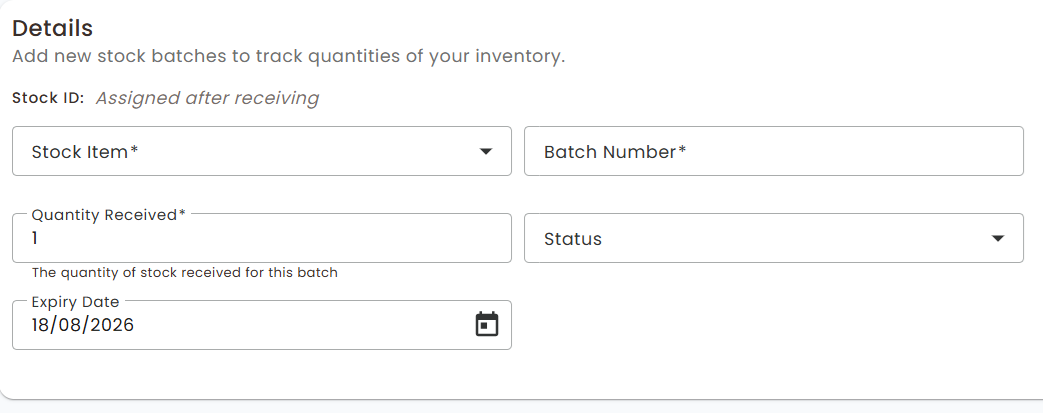
The Stock ID does not need to be entered. The Stock ID field shows Assigned after receiving while you are receiving the stock.
Select the Receive Stock button to complete the process.
Once received, LabHQ assigns the next unique Stock ID to the new record.
Viewing a Stock ID
Stock IDs are displayed throughout the Stock module, including:
- Recently received stock - The Stock ID is displayed for each newly received stock record.
- Inventory - Open a stock item to view its available batches and their Stock IDs.
- Adjust stock - Select a stock item and then select the Stock ID for the specific stock you want to adjust.
- Usage tracking - The Stock ID is recorded against stock usage and adjustment history.
- Expired stock - Each expired or expiring stock record displays its Stock ID.
Selecting the Correct Stock
A single stock item can have multiple records in LabHQ, including records with the same batch number.
When selecting stock for adjustment, usage or disposal, use the Stock ID alongside the item and batch information to make sure you select the correct physical stock record.
For example, if two records exist for the same stock item and both have batch number 1234, they will appear as:
- STK-5 - Batch 1234
- STK-7 - Batch 1234
The Stock ID allows you to distinguish between these records and ensures that quantities, usage and disposal are recorded against the correct stock.
Editing a Stock Batch
The Stock ID is fixed once the stock has been received and cannot be changed.
When editing a stock batch, its Stock ID is displayed at the top of the batch details for reference.
Other permitted information, such as batch number, status or expiry date, can still be updated.
Traceability
Stock IDs are included in related audit entries, providing a consistent reference for tracing activity associated with an individual stock record.
This allows the same stock record to be followed from receipt through adjustment and usage to expiry or disposal.